Güncelleme özeti1)Seçim gurubu oluşturulurken kullanıcı tanımlı bir birleşim parçası seçilirse oluşan atma sorunu giderildi.
2)Kullanıcı tanımlı iki kiriş kesiminde oluşan hatalı durum giderildi.
3)Makas makrosuna ara mesafe değeri girilirse sonrasında ara boşluğu bulunmayan bir kesit seçilirse oluşan atma sorunu giderildi.
4)Çok fazla sayıda kar rüzgar ve ısı yüklemesi sonucu oluşan çok fazla p delta çözülen kombinasyon altında (1200 adet) 2-3 kat hızlandırma sağlandı.
5)Üst katta çok kısa olan kolonlarda Vup bulmada oluşan sorun giderildi.
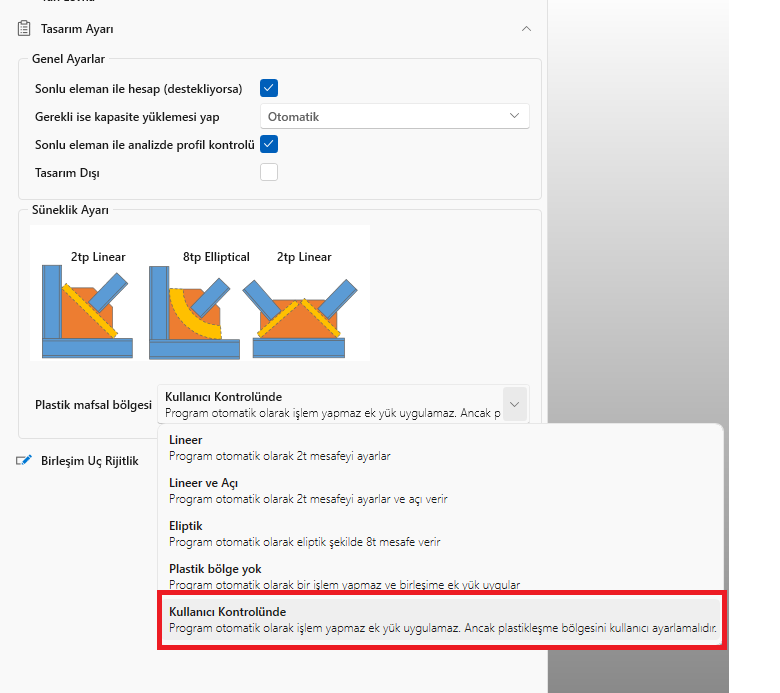
6)Çapraz levhalarında otomatik olarak plastikleşme bölgesi oluşturma seçenekleri arasına kullanıcı tanımlı eklendi. Bu opsiyon seçildiğinde program birleşimde bir kapasite hesabı yapmaz ancak 2t gibi ara boşlukların oluşturulmasından kullanıcı sorumludur. Bu seçenek seçildiğinde program kapasite yüklemesi yapmaz ve uyarı vermez.
Click to View Image284 View(s)
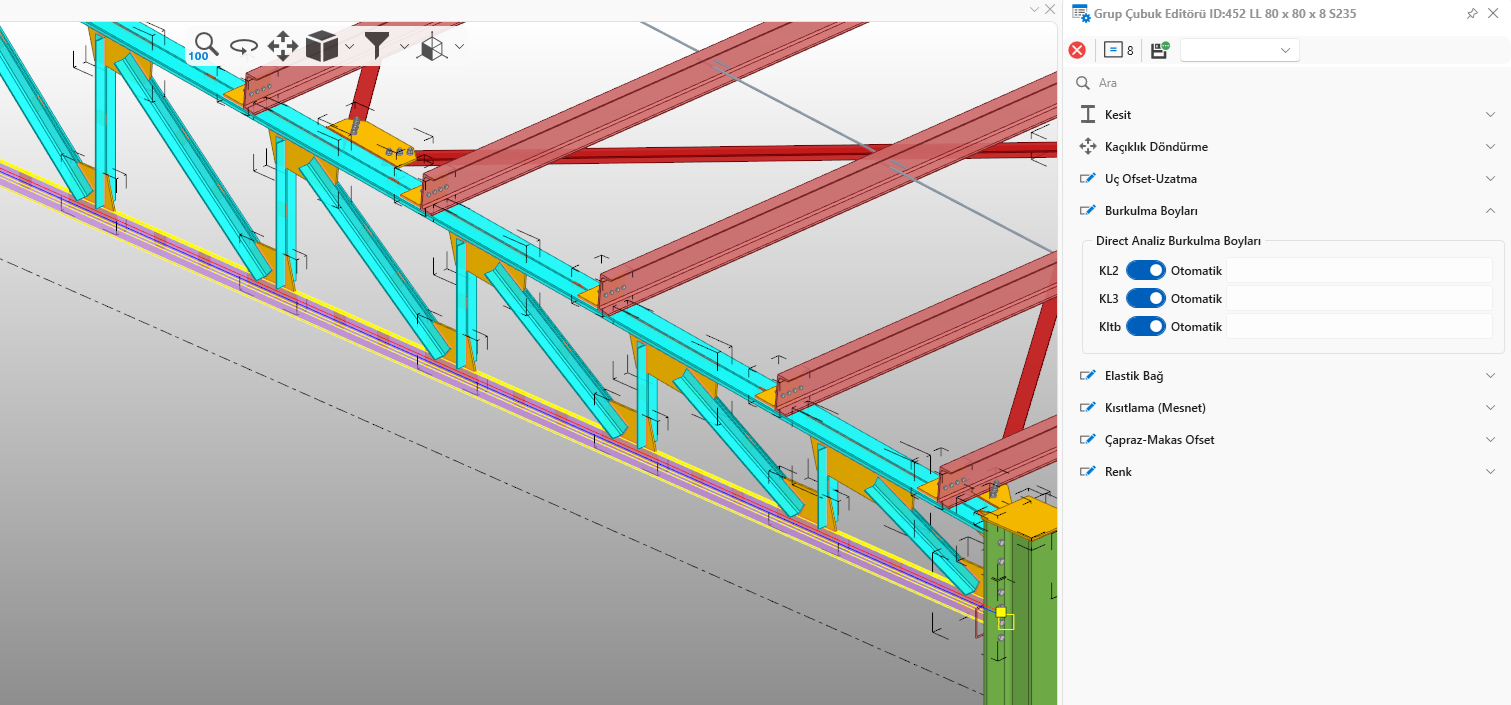
7)makro içindeki elemanlara burkulma boyu tanımlama imkanı eklendi. Alt tuşu ile eleman ctrl+alt tuşu ile elemanlar seçilip editör kullanılabilir. Bu sayede burkulma boyu tanımı için makroyu patlatmanıza gerek kalmaz.
Click to View Image287 View(s)
8)Otomatik kar yükü hesabında genel ayarlardan birikim kapatılsa bile birikim almaya devam edilmesi sorunu giderildi.
9)Bazı özel durumlarda çapraz levhasının gereğinden büyük olması durumu giderildi.
Bu durumda olan bir modelde levha boyutu değiştiği için çizim ve tasarımda değişiklik olmaktadır. 10)v2 de olan ancak v3 te olmayan yüksek sünek sistemde sadece çekmeye çalışan çapraz kullanılamaz uyarısı eklendi.
11)Daha önceki güncellemelerde tüm makrolara sadece çekmeye çalışan çubuk özelliği eklenmişti. Bu özellik ile beraber çapraz makrosunda bulunan sadece çekmeye çalışan çubuk özelliği devre dışı kalma sorunu oluştur. Bu orun giderildi.
Bu durumda olan modellerde sadece çekmeye çalışan çubuk özelliği devre dışı kaldığı için
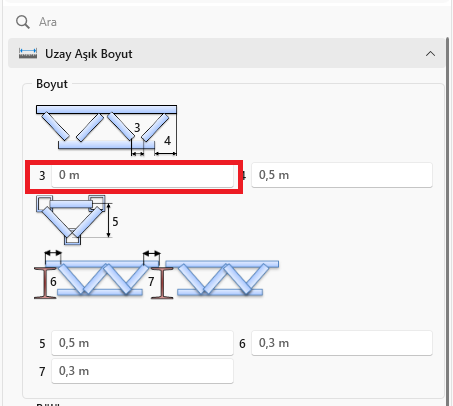
düzeltme sonrasında analiz sonuçlarında değişme olabilir. 12)Aşık makasta ekteki opsiyonun çalışmaması sorunu giderildi.
Click to View Image271 View(s)
13)Guruplara eklenen tasarım dışı seçeneğinden kaynaklı olarak merdiven makrosunda basamaklar tasarım dışı olsa dahi tasarıma girmesi sorunu giderildi.
14)Kullanıcı tanımlı kesitlerde kesit değiştikten sonra alınan metrajda ağırlık değerini güncellenmemesi sorunu giderildi.
15)Şaşırtmalı bulonların teklaya aktarım sorunu giderildi.
16)Başka bir modelin içeri alınmasında model içinde bulunan kullanıcı tanımlı elemanların alınmaması sorunu giderildi.
17)Bodrum kat olan modellerde bodrum kat perdeleri veya kolonları bodrum kat yüksekliği ile uyumlu olmayan durumlarda bodrum kat algılamasında iyileştirme yapıldı. (STAsteel ve workshop )
Update summary1) The throwing problem when a user-defined connection piece was selected during the creation of the selection group has been resolved.
2) The erroneous situation that occurred when two user-defined beam sections were selected has been resolved.
3) The throwing problem that occurred when an intermediate gap value was entered into the truss macro and then a section without an intermediate gap was selected has been resolved.
4) P-delta analyses were accelerated.
5) The problem of finding Vup has been resolved.
6) User-defined options have been added to the automatic plasticization zone creation options in brace plates. When this option is selected, the program does not perform a capacity calculation in the joint, but the user is responsible for creating gaps such as 2t. When this option is selected, the program does not perform a capacity load and does not give a warning.
Click to View Image284 View(s)
7) The ability to define buckling length for elements within the macro has been added. Elements can be selected using the Alt key or Ctrl+Alt key, and the editor can be used. This eliminates the need to explode the macro for buckling length definition.
Click to View Image287 View(s)
8) The issue of continuing to calculate accumulation snow load even when accumulation is disabled in the general settings of automatic snow load calculation has been fixed.
9) Fixed an issue where the brace plate was excessively large in certain special cases.
In this situation, the plate size changed, resulting in changes to the drawing and design.10) A warning has been added stating that the "tension-only brace cannot be used in high ductility systems" feature, which was present in v2 but not in v3.
11) In previous updates, only tension feature was added to all macros. This feature caused an issue where the only tension feature in the brace macro was disabled. This issue has been fixed.
12) The issue of the attached option not working in the truss purlin has been fixed.
Click to View Image271 View(s)
13) The issue with the out-of-design option in the staircase macro has been fixed.
14) The issue of the weight value not being updated in the quantity after the section change in user-defined sections has been fixed.
15) The issue of transferring staggered bolts to Tekla Structure has been fixed.
16) The issue of user-defined connection elements within the model not being included when importing another model has been fixed.
17) Improvements have been made to the basement detection in models with basement floors where basement floor walls or columns are not compatible with the basement floor height. (STAsteel and workshop)